Export conversations
Turn chats from Codex, Claude Code, Cursor, OpenCode and other tools into readable Markdown, PDF, HTML or Quarkdown documents, with the template you choose.
Export in four steps
Pick the sessions
In Sessions, tick the sessions you want (or open one) and choose Export…. The export window opens with those conversations.
Choose conversations
Check the list: you can remove or add chats, and Select all includes every page. For loose files (JSONL, SQLite or ZIP) use Integrations › Export chats by agent or from a file.
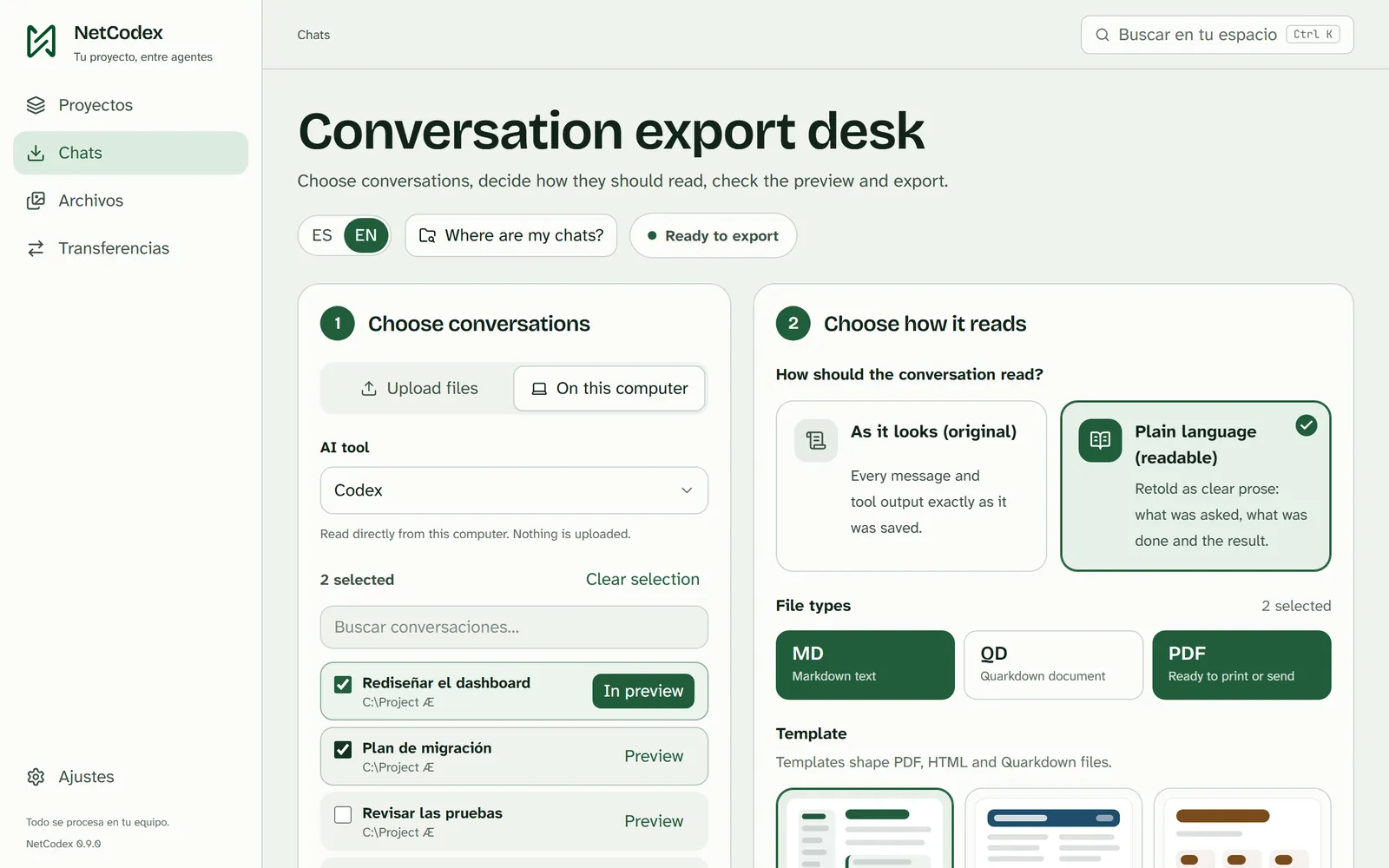
The export desk: conversations on the left, how they read and the file types on the right. Choose how it reads
Plain language (readable) opens with a short story (what was asked, what was done and how it ended), keeps every message in full and sums up each tool step in one sentence. No AI: it is generated on your computer from fixed sentences. As it looks (original) keeps every message and tool output exactly as it was saved.
Pick file types and a template, then export
Choose the file types and a template, check the preview and choose Export. When it finishes, Download ZIP gives you every file.
File types
Templates
Before you share an export
- Keep Include full file paths off: paths can contain your user name.
- Exports stay on your computer until you send them somewhere yourself.
- The readable view hides system and environment context; the original view shows everything.
Screenshots show sample data.