Troubleshooting
Fixes for the problems people run into most, from a missing WebView2 to a chat that does not show up in the other app.
WebView2 is missing or the window does not open
NetCodex needs Microsoft Edge WebView2. If it is missing, a Windows message offers to install it; with the portable .exe it opens Microsoft's download page. Install it, then open NetCodex again.
If the window cannot open for another reason, a Windows message shows the reason and the log file, %APPDATA%\NetCodex\netcodex-desktop.log. Include that file if you report the problem.
Antigravity does not close
NetCodex asks Antigravity to close the normal way and waits up to 20 seconds. It never forces an app to quit, so an unsaved-work question or a busy task can keep it open. Then NetCodex says We could not close Antigravity.
- Switch to Antigravity, save your work and quit it (if it has an icon next to the clock, right-click it and choose Quit).
- Back in NetCodex, choose Try again. The copy continues where it stopped, without duplicates.
The chat does not appear in Claude Desktop
Claude Desktop only loads new sessions when it starts. Choose Restart Claude Desktop in NetCodex, or quit Claude Desktop completely (also from its icon next to the clock) and open it again. Then look in the Code tab, under the project folder.
If NetCodex says Open Claude Desktop, visit the Code tab once and try again, Claude Desktop has not set up its Code tab on this computer yet. Do exactly that, then choose Try again.
The chat is not inside a project in Codex
NetCodex registers the folder as a Codex project automatically. Some older Codex versions do not allow this, and NetCodex shows a last step instead:
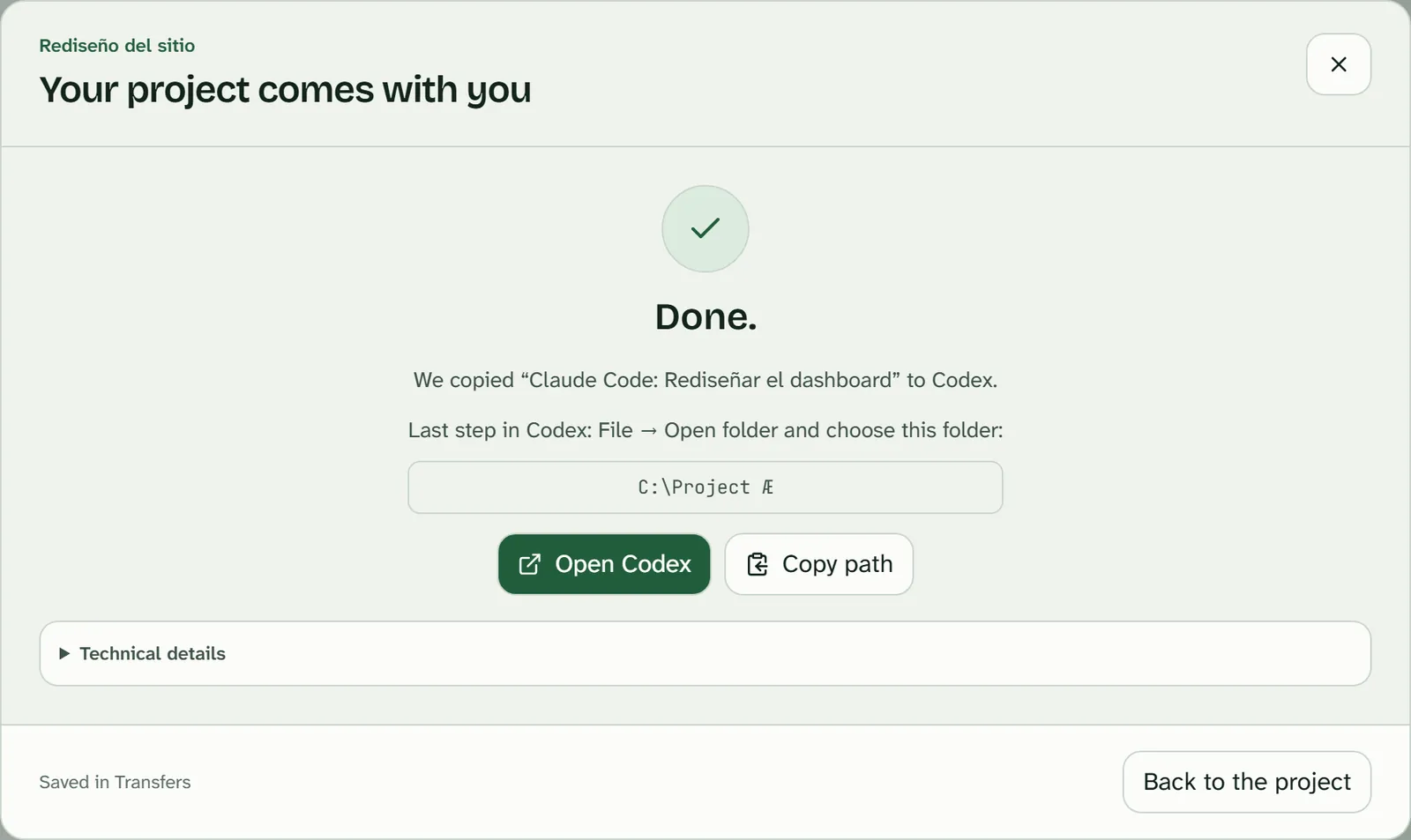
- Choose Copy path.
- Choose Open Codex, then File → Open folder in Codex.
- Paste the path and open it. The copied chat is in that project.
If NetCodex says Codex was not found on this computer, install Codex or open it once, then try again.
OpenCode asks you to sign in again
The copied chat is fine: OpenCode keeps its own sign-in to your AI provider, and that sign-in can expire. Sign in again inside OpenCode (in a terminal: opencode auth login), then reopen the session and keep chatting.
If NetCodex says OpenCode has no model selected yet, open OpenCode, choose a model and choose Try again in NetCodex.
SmartScreen or antivirus warnings
The installer is not code-signed yet, so SmartScreen may say Windows protected your PC: choose More info, then Run anyway (see Install). Some antivirus products also flag new unsigned apps. Compare the file's SHA-256 with the one on the download page; if it matches, you can allow the file or restore it from quarantine, and report the false positive to your antivirus vendor.
An update does not install
The notice says why. Without a connection, NetCodex tries again later. If the update information is not signed by NetCodex, or the download does not match the published version, nothing is installed. You can always download the latest version from Install.
Still stuck?
If you use the command line, netcodex doctor checks WebView2, the PDF browser, Quarkdown, access to each tool's chats and your settings, and says what to fix.
Screenshots show sample data.